AI Invoice Importer
One tool for every client, every platform. Xero. Sage 50. QuickBooks.
Your clients use different accounting platforms. You shouldn't need different tools for each one. Invoice Importer processes invoices across Xero, Sage 50, and QuickBooks from a single dashboard — with per-client configuration, bulk processing, and 98%+ accuracy.
No credit card · 15 invoices/month free forever
Features
What it does.

Any Invoice Format
PDF, images, Word documents, HEIC photos — upload anything. No templates, no setup. Claude AI reads and understands every layout automatically.

98%+ Accuracy with Claude AI
Powered by Anthropic's Claude, not rigid OCR rules. Understands context, handles unusual layouts, and achieves 98%+ end-to-end success across real-world invoices.

Xero, Sage 50 & QuickBooks
Direct API integration with Xero and QuickBooks Online. Sage 50-compatible CSV export. One tool for all three major UK accounting platforms.

Bulk Upload up to 200 Files
Upload entire invoice folders at once. Process up to 200 files in a single batch with real-time progress tracking. Available on all plans.

Email Forwarding
Forward invoices to your dedicated email address and they are processed automatically. Available on Professional and Agent plans.

Bank Statement Processing
Upload any bank statement and extract all transactions in seconds. Export to your accounting software instantly. Available on Professional and Agent plans.
How it works
4 simple steps.
Upload
Drag and drop invoices in any format — PDF, image, Word, or HEIC. Upload one at a time or up to 200 in a single batch.
AI Extracts
Claude AI reads every invoice in seconds, extracting supplier, dates, line items, tax, and totals with 98%+ accuracy.
Review
Check the extracted data side-by-side with the original invoice. Edit anything before posting. Inline PDF preview included.
Posted
One click to post directly to Xero or QuickBooks, or export as Sage 50 CSV. Duplicate detection prevents double entries.
See It In Action
The dashboard you’ll actually use.
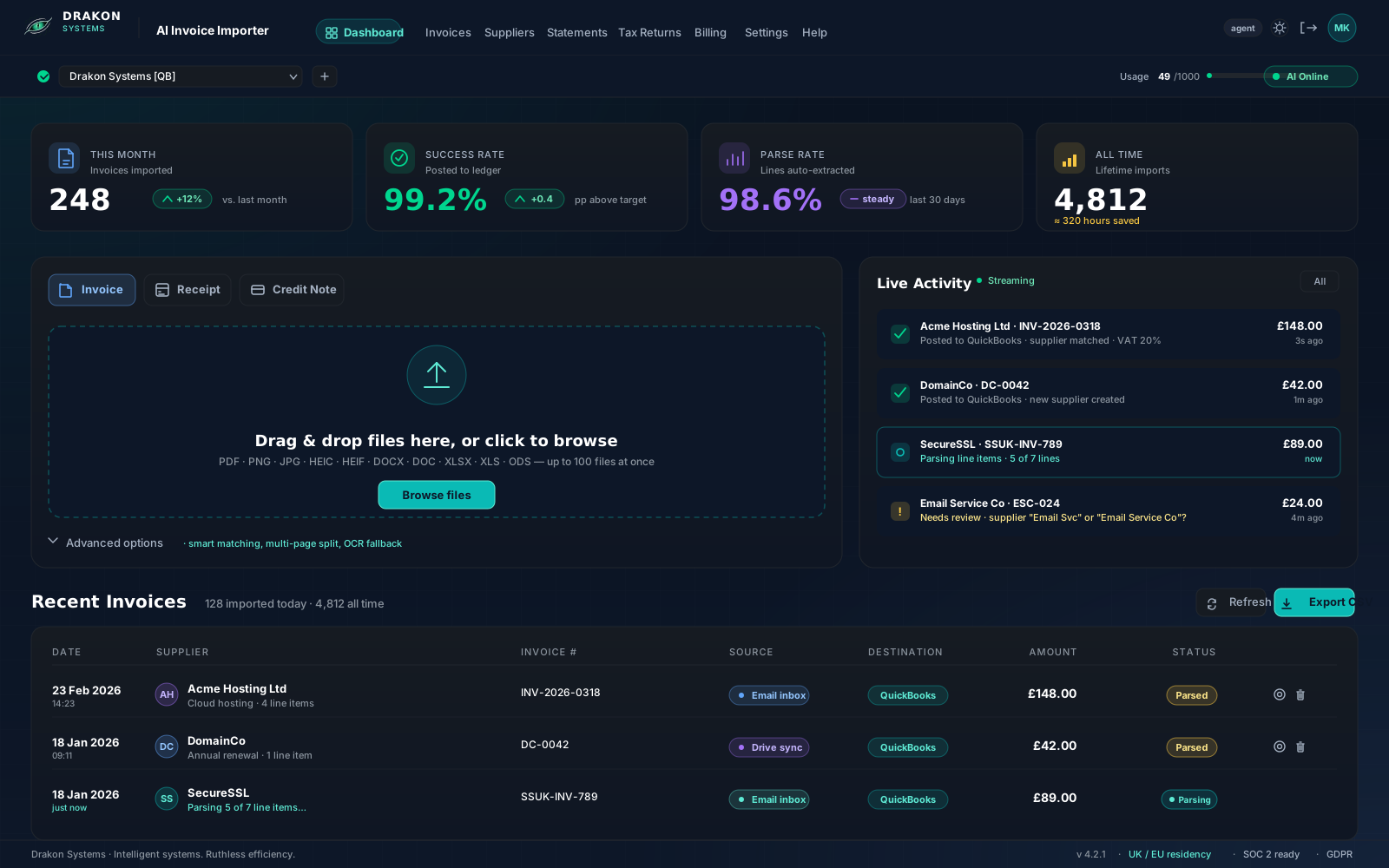
Per-org connection switcher, live AI status, monthly KPIs at a glance, and one-click access to invoices, statements, and tax returns.
Why Practices Choose Us
Built for Practices. Not Just Platforms.
Xero has built-in document capture. So why do accounting practices choose Invoice Importer?
Multi-Platform
Your clients don't all use Xero. Process invoices into Xero, Sage 50, and QuickBooks from one dashboard. Switch between clients in seconds.
Bulk Processing
Upload 200 invoices at once, not one at a time. Batch processing that matches how practices actually work — month-end isn't one receipt at a time.
Per-Client Configuration
Set custom tax defaults, account code mappings, date formats, and approval workflows for each client. Their chart of accounts, your rules.
728+ Supplier Mappings
Auto-map suppliers across all your client organisations. Set it once, process forever. No re-mapping when you switch clients.
Feature Comparison
Xero Has Smart Capture. Here’s What It Doesn’t Do.
Smart Document Capture is great for individual Xero users. If you’re running a practice, here’s the full picture.
Xero Smart Capture
Platforms
Xero only
Bulk upload
One at a time
Per-client config
No
Bank statements
No
Tax returns
No
Multi-org dashboard
No
AI model
Xero's built-in
Email forwarding
Basic
Invoice Importer
Platforms
Xero + Sage 50 + QuickBooks
Bulk upload
Up to 200 documents
Per-client config
Custom tax, accounts, date formats
Bank statements
Yes
Tax returns
Yes
Multi-org dashboard
Yes — switch clients instantly
AI model
Claude AI (98%+ accuracy)
Email forwarding
Automated pipeline
Xero Smart Capture is built for individual users. Invoice Importer is built for practices running multiple clients across multiple platforms.
The Product
Clean interface. Real results.
Real screenshots from a live production system.

100% parse rate. Drag and drop.

728 suppliers. Auto-mapped to Xero.

Bank statements too. Not just invoices.

Full help center. Self-serve support.
Integrations
Multi-Accounting System Support
Xero
Direct Integration
- ✓Direct API connection
- ✓Automatic contact matching
- ✓Multi-currency support
- ✓Up to 10 connected orgs (Agent plan)
Sage 50
CSV Export
- ✓Sage 50-compatible CSV format
- ✓Transaction type mapping
- ✓Tax code support
- ✓Batch export ready
QuickBooks
Direct API
- ✓QuickBooks Online API
- ✓Vendor matching
- ✓Expense account mapping
- ✓Currency conversion
Agent Plan
Built for Accountants
Manage multiple clients from a single account with per-client settings. Connect up to 10 Xero organisations and customise everything per client.
Per-Client Tax Defaults
Set default tax rates and codes for each client organisation
Custom Account Mapping
Map expense categories to your chart of accounts per client
Date Format Preferences
Configure UK, US, or international date formats per client
Approval Workflows
Set review requirements before invoices are posted
98%+
AI accuracy
3
platforms supported
200
documents per batch
728+
suppliers mapped
Pricing
Simple, transparent pricing.
Free
£0/mo
15 invoices per month
- ✓Claude AI parsing
- ✓Xero integration
- ✓Duplicate detection
- ✓1 Xero org
- ✓Bulk upload (5 files)
Starter
£29/mo
150 invoices (19p each)
- ✓Everything in Free
- ✓10 GB storage
- ✓Bulk upload (20 files)
- ✓Sage 50 & QuickBooks export
Professional
£79/mo
500 invoices per month
- ✓Everything in Starter
- ✓Email forwarding
- ✓API access
- ✓Bank statements
- ✓Bulk upload (100 files)
- ✓Priority support
Agent
£139/mo
1,000 invoices per month
- ✓Everything in Professional
- ✓Up to 10 Xero orgs
- ✓Per-client settings
- ✓Bulk upload (200 files)
- ✓Dedicated support
Frequently Asked Questions
Xero now has built-in document capture. Why would I use Invoice Importer?+
How accurate is the AI extraction?+
What invoice formats are supported?+
How does it work with Xero, Sage 50, and QuickBooks?+
Is there a free trial?+
How is my data kept secure?+
How long does it take to process an invoice?+
Try it free — no credit card required
Get 15 free invoices every month. Upload any format, extract with Claude AI, and post to Xero in seconds. No commitment, no credit card, no setup.